
Heart Rate and Respiratory Rate
What parameters are recorded, and where can I view them?

Parameters recorded:
- Heart Rate - the number of times the heart beats within a minute which is measured in BPM (beats per minute).
- Respiratory Rate - the number of breaths a person takes per minute which is measured in BRPM (breaths per minute).
- Wheeze - a continuous, coarse whistling sound produced in the respiratory airways during breathing.
To view your vital signs readings, go to the top section of the Home tab. To view the past records of your vital signs readings and wheeze occurrences, go to the Summary tab.
What does last use mean?
Last Use shows the most recent session of recording. One session of recording begins from the moment the AeviceMD Sensor picks up the first reading and ends when it is placed back onto the AeviceMD Docking Station.
How do I read the graph?
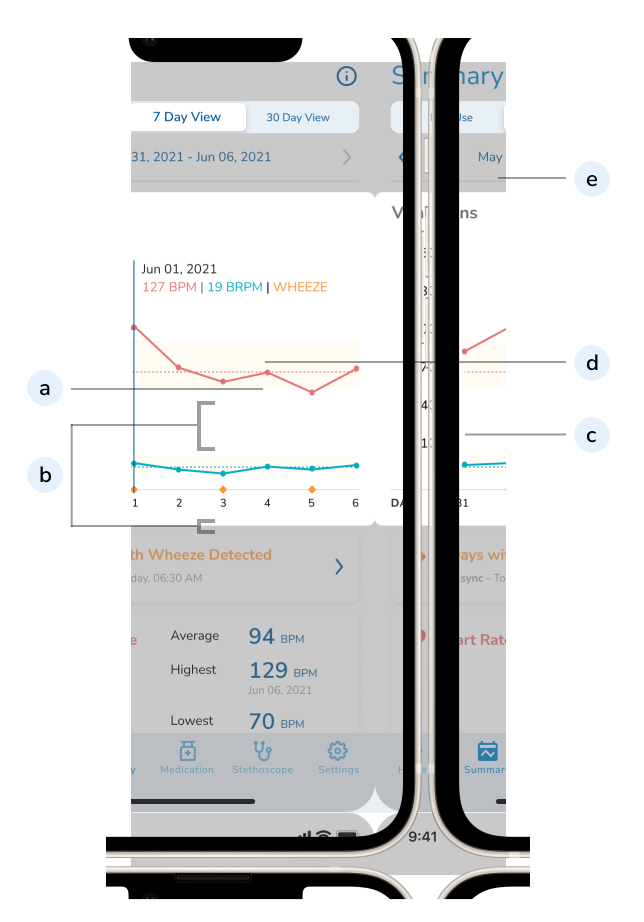
(a) Trendline(s) represents the Heart Rate (HR) and Respiratory Rate (RR) measurements recorded.
(b) Yellow area across the graph represents the vital sign range set by your Healthcare Professional.
(c) Dotted Line(s) across the graph represents the average of your HR and RR readings throughout this monitoring session.
(d) To view specific readings on the graph, move the blue vertical line across the graph.
(e) To view trends across different time periods (Last Use, 7 Day View, 30 Day View), toggle between 3 tabs under the Summary header.
How do I tell if my vital signs are within the acceptable range?
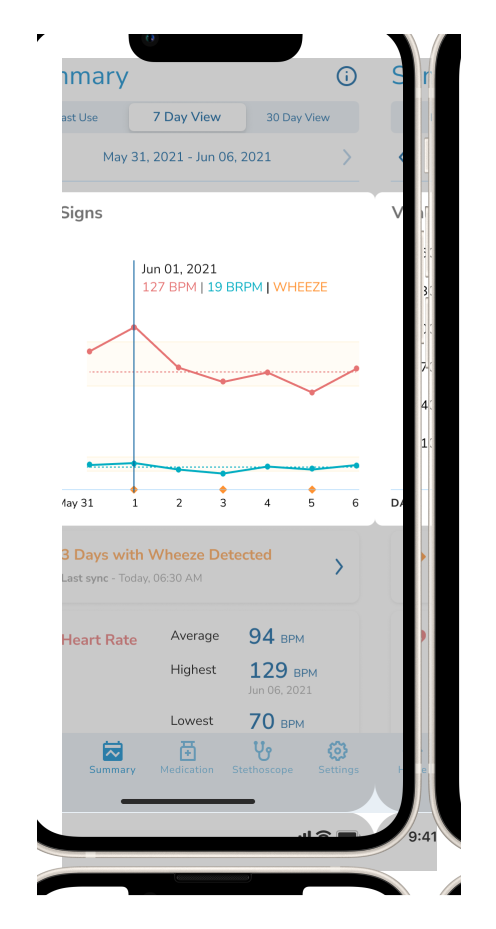
Vital signs within the yellow area across the graph are within the acceptable range. Yellow area across the graph represents the vital signs range set by your healthcare professional.
What are the factors that affect the quality of my vital signs readings?
To attain better quality vital signs readings, you should follow these recommendations:
- Allow monitoring to take place when you are at rest.
- Ensure you are in a quiet environment with minimal noise and movement.
- Ensure your Silicone Patch is sticking well.
Related Topics:
Why are there gaps in my last use chart?
Gaps in your vital signs charts are normal and do not indicate any health issues on their own.
There may be gaps in your last use chart due to the following circumstances:
- Poor signal quality due to increased motion.
- Increase in external noise level.
- Sudden Wi-Fi disconnection.
- AeviceMD Sensor is more than 32 feet away from the AeviceMD Docking Station.
- AeviceMD Sensor dropped off during monitoring.
- AeviceMD Sensor has no battery.
- AeviceMD was not used continuously throughout the session.